


When building complex web applications with generative AI, massive text specifications can quickly exhaust large language model token limits. Learn how structural prompt blueprinting compresses system requirements to generate fully functional software without running out of memory.
The Invisible Wall in AI Code Generation
Generative AI platforms have completely shifted the paradigms of traditional software engineering. By utilizing high-capacity large language models (LLMs), engineering teams, software developers, and startup founders can describe full application workflows using natural language and watch complete frontend and backend code blocks compile in real time. Yet, as developers transition from building basic code mockups to shipping feature-rich enterprise platforms, they inevitably crash into a frustrating computational ceiling: **the context window token limit**.
Every large language model processes data in discrete linguistic chunks called tokens. A token roughly corresponds to four characters of English text or a single word snippet. The model’s context window acts as its immediate working memory, containing both the incoming instructions you type and the code output the model generates in response.
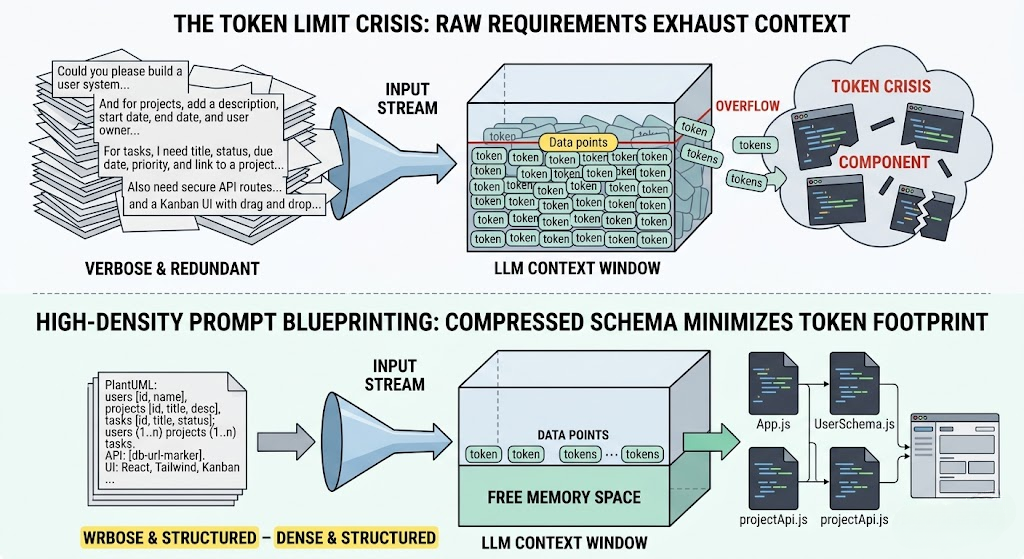
When you attempt to generate a full-scale web application with multiple data tables, complex business logic rules, extensive security roles, and intricate user interface mockups, your raw text specifications expand exponentially. If your instructions consume too much of the context window before the AI model even begins typing, you trigger a token limit crisis. The model will run out of memory, resulting in broken dependencies, truncated code files, halluncinated database pathways, or a complete system collapse midway through your application development lifecycle.
Why Conversational Prompting Fails for Complex Software
The primary driver of token exhaustion is relying on unstructured, conversational chat prompting. When developers interact with AI code generators using conversational dialogue, the context window fills with repetitive, low-density data structures:
- Polite Conversational Fillers: Phrases like “Could you please update the code from my previous message” add zero functional value but waste valuable token metrics.
- Redundant Code Restatements: Every time you ask a chat assistant to modify a single button element inside an application script, the model frequently rewrites the entire 500-line client file, consuming thousands of context window buffer allocations redundantly.
- Disorganized Schema Descriptions: Describing complex data relationships using unstructured natural language requires multiple paragraphs of text to explain what a single declarative diagram could communicate instantly.
As the conversational history deepens, older architectural guidelines, structural database constraints, and API link pathways are pushed completely out of the model’s active working memory. This results in the AI dropping essential backend functions, inventing duplicate variables, or generating invalid frontend views that fail to compile entirely.
The Solution: High-Density Prompt Blueprinting
To overcome the token limit crisis, modern software development workflows must transition away from unstructured dialogue toward **deterministic prompt blueprinting**. Instead of feeding raw, unorganized textual requirements to the LLM, developers compress technical constraints into dense, mathematically rigid instruction tokens before executing a code generation request.
High-density blueprinting works by substituting verbose natural language explanations with declarative schema definitions and externalized infrastructure markers. By defining your relational database structure through a plain-text diagram language like PlantUML or establishing live backend database URLs prior to prompting, you completely offload the heaviest architectural lifting from the model’s memory footprint.
For instance, rather than spending 800 tokens explaining how Users, Projects, and Tasks dynamically link together across an organization, a concise declarative relationship string communicates the exact same architectural directive in under 30 tokens. This saves immense context window space, leaving maximum memory available for the AI code builder to generate complete, production-ready source code files on its first try.
How Visual Paradigm App Studio Compresses Your Token Footprint
Manually condensing complex requirements into compact, token-optimized data structures while managing secure cloud backends is an incredibly precise technical task. Visual Paradigm’s AI-Powered App Studio streamlines this step by automatically abstracting your software architecture into an optimized blueprint prompt payload.
App Studio resolves the context window problem by splitting your application building workflow into distinct, memory-efficient phases:
- Data Model Consolidation: You enter your basic text requirements into the dashboard or paste a plain-text PlantUML database script. The internal AI engine optimizes your concepts, instantly mapping your architecture inside a highly compact visual Entity-Relationship Diagram (ERD).
- Offloading the Backend Layer: Instead of wasting valuable prompt tokens asking an external LLM to invent, simulate, or mock database storage endpoints, App Studio provisions an active, secure cloud database container automatically. The platform instantly creates zero-configuration backend REST web APIs to process live database records safely.
- UI Style and Layout Tokenization: You navigate to the customization dashboard to select your core client stack (such as React, Svelte, Vue, or Angular) and choose your preferred design layout archetypes (like Kanban boards, multi-pane Tabs, or split List-with-Details configurations) alongside utility systems like Tailwind CSS v4.
- Synthesis into a Unified Blueprint Prompt: The workspace engine compiles your framework targets, visual token settings, schema definitions, and live cloud api connection strings into a high-density, completely unambiguous **AI Blueprint Prompt** payload window.
By extracting your live database hosting requirements from the conversational loop, your prompt remains exceptionally lightweight. You simply copy this deterministic blueprint prompt directly into high-capacity large language model environments like Google AI Studio. The generative engine reads the precise structural guidelines and outputs completely active, beautifully styled frontend client applications that communicate with your running cloud container right out of the box—all while using a fraction of your context window token allotment.
Maximizing Workflow Velocity via Automated Data Seeding
Once your external LLM reads the blueprint and outputs your working frontend client code, evaluating the interface structure can consume secondary memory limits if done manually. Testing form fields, validation states, and data list displays usually forces teams to cycle prompts back and forth to refine visual layouts.
App Studio bypasses this secondary loop through its integrated synthetic data seeding tool. From your centralized control panel, you can run a background script that populates your live database containers with rich, contextually accurate records instantly. Your application dashboards, grid views, and column lanes fill with realistic test data automatically, allowing you to visually validate responsive view states and layout elements under true operational conditions without wasting a single generative prompt token on layout debugging.
Conclusion: Engineering Smarter Code Generation Lifecycles
Conquering the token limit crisis requires a fundamental shift in how we communicate with artificial intelligence systems. Attempting to build complex software through unstructured chat threads inevitably exhausts large language model memory windows, introducing severe architectural bugs and hallucinations into your production pipeline.
By shifting your framework to a data-first blueprint strategy, provisioning cloud backend databases independently, and using dense structural prompt syntax, you protect your context window allocations, eliminate code execution defects, and accelerate your development timeline with complete predictability.
Ready to deploy your hosted database container and export an optimized application blueprint prompt? Begin your configuration inside the Visual Paradigm App Studio Workspace today. Complete application building access is immediately available for active subscribers of the Visual Paradigm Online Combo Edition and Desktop Professional Edition license suites.
Related posts:
 Prompt Engineering vs. Blueprint Engineering: The New Way to Build AI Apps
 React vs. Svelte vs. Vue: Choosing the Right Frontend for Your AI-Generated App
 Beyond Vanilla CSS: How UI Styles Like Neobrutalism and Glassmorphism Elevate AI Apps
 Dashboard Layouts Demystified: When to Use Kanban, Tabs, or List-with-Details