


Writing application prompts manually is an unpredictable, error-prone approach to software engineering. Discover how deterministic prompt builders automate prompt engineering to generate stable, production-ready web applications consistently.
The Vulnerability of Handcrafted AI Prompts
The sudden explosion of generative artificial intelligence has fundamentally changed the economics of custom web software development. Today, anyone can open an advanced Large Language Model (LLM) workspace, type an abstract idea in plain text, and watch working code blocks stream across the screen. This interactive approach has made rapid software prototyping accessible to individuals and teams alike. However, as software engineers, product managers, and enterprise developers attempt to push past basic mockups toward building complex, production-ready applications, they inevitably run into a critical structural barrier: **the instability of manual prompt engineering**.
When you sit down to write an application prompt completely from scratch, you are relying entirely on natural language to dictate technical infrastructure. Human language is inherently imprecise, ambiguous, and open to interpretation. Because LLMs operate on statistical probabilities rather than rigid execution rules, small variations in how you phrase an instruction can completely alter the resulting source code structure. A prompt that outputs a perfect React interface on Tuesday might generate a broken, disconnected script on Wednesday—leaving your development workflow vulnerable to unexpected code drift and costly debugging loops.
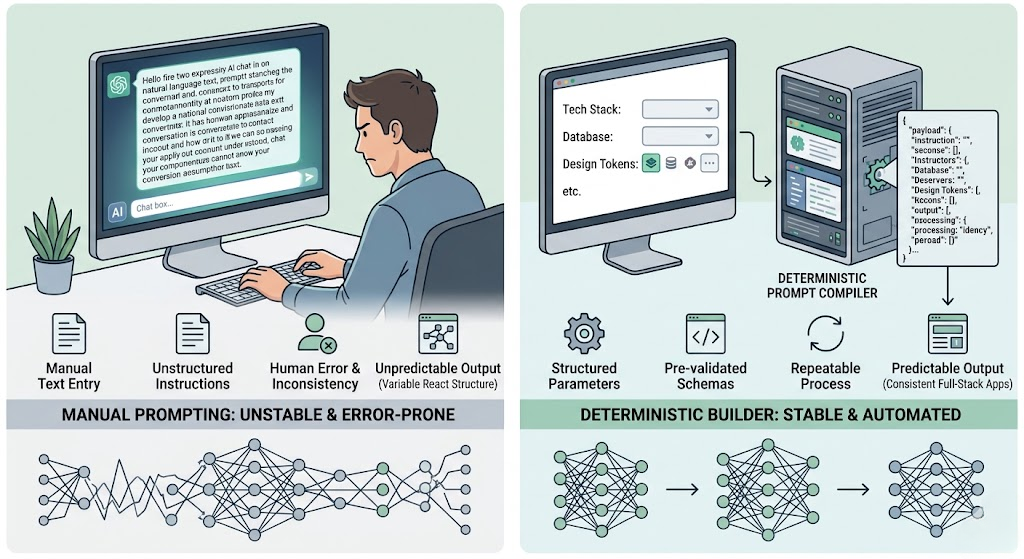
Why Manual Prompt Engineering Fails at Scale
Relying on custom, handwritten text instructions to build full-stack web applications introduces three distinct architectural flaws into your development pipeline:
- The Lack of an Absolute Source of Truth: If you do not anchor your instruction text to a live database or a pre-validated schema model first, the AI model has to guess your table relationships. It will frequently hallucinate database pathways, drop unique field constraints, or switch variable properties between files.
- Token Footprint Inefficiency: Writing long, conversational explanations to guide an AI assistant wastes valuable context window tokens. As a chat conversation deepens, your original technical guidelines can be pushed entirely out of the model’s active working memory, causing the application logic to collapse.
- The Burden of Manual DevOps Configuration: Even if your custom prompt successfully coaxes the AI into writing clean frontend component views, a text prompt cannot deploy servers. You are still left with the manual chore of setting up cloud hosting containers, configuring database access roles, and managing live web API connections.
To eliminate this architectural guesswork, software engineering must transition away from unstructured conversational prompting toward a structured approach: **Deterministic Prompt Builders**.
What Makes a Prompt Builder Deterministic?
A deterministic prompt builder is a specialized software environment that completely removes human ambiguity from the generative workflow. Instead of expecting you to write a massive text document explaining your tech stack, design tokens, and database layout by hand, it programmatically compiles these precise technical variables into an optimized, high-density instruction payload.
Instead of treating the large language model as a creative copywriter, a deterministic builder treats it like an exact compiler. By providing the AI with rigid boundaries—such as pre-validated relational schemas, hardcoded backend API routes, and strict interface layout types—the output becomes highly predictable. The model is given an absolute map to follow, ensuring it generates functional, integrated software on your very first execution try.
How Visual Paradigm App Studio Automates the Compilation Pipeline
Constructing a token-optimized, high-density blueprint prompt payload manually requires extensive DevOps expertise and an intimate understanding of context window dynamics. Visual Paradigm’s AI-Powered App Studio automates this entire technical orchestration pipeline, functioning as a professional-grade deterministic builder that links your ideas directly to live cloud infrastructure in four automated phases:
- Data Model Mapping: You enter your core application goals into the workspace text area using an integrated AI prompt enhancer, or you directly paste a plain-text PlantUML database script. The platform’s internal relational engine immediately validates your inputs and visualizes your architecture using an interactive visual Entity-Relationship Diagram (ERD).
- Live Backend Provisioning: By supplying your administrative credentials, App Studio instantly provisions a secure, cloud-hosted database container and exposes fully functional REST web APIs to process live database queries securely. Your application data has a permanent, running home before any frontend code is ever generated.
- UI Customization Assembly: You navigate to the centralized control center to select your precise client-side parameters from simple dashboard dropdowns, choosing your target framework (such as React, Svelte, Vue, or Angular) and your preferred visual design tokens (like utility-first Tailwind CSS v4, Glassmorphism, or Neobrutalism). You then lock down an explicit layout archetype, such as a multi-lane Kanban board, categorical Tabs, or a split List-with-Details view.
- Blueprint Prompt Generation: The platform instantly processes your selections and compiles them into a unified, token-dense **AI Blueprint Prompt** payload box.
Because your running database infrastructure, API credentials, table structures, and UI parameters are hardcoded directly into this output payload, the instruction set is completely stable. You simply copy this blueprint prompt and paste it directly into advanced generative developer workspaces like Google AI Studio. The model reads the structured guidelines and outputs fully active frontend client code that reads and writes live database records perfectly out of the box, eliminating text-based hallucinations entirely.
Accelerating Lifecycle Testing via Automated Mock Data Seeding
A primary bottleneck when generating full-stack applications is validating your custom frontend client under realistic runtime conditions. A freshly generated interface layout is difficult to evaluate when your live cloud database contains no active records. Typing sample strings into forms manually to inspect scroll mechanics or verify item sorting can waste hours of development time.
App Studio resolves this testing challenge by embedding a synthetic data seeding utility directly into your project dashboard hub. With a single click, you can activate a background script that instantly populates your live cloud database tables with rich, contextually accurate mock data records. Your generated application lists, Kanban lanes, and data tables fill with realistic records instantly, allowing your team to visually review interface element wrapping, verify structural view states, and run QA testing under true operational loads immediately.
Conclusion: Shifting from Prompt Writing to Software Engineering
Continuing to write long, unstructured application prompts from scratch limits your development velocity and binds your software prototypes to unpredictable AI variations. True scalability in generative development is achieved by separating your infrastructure from the conversational loop.
By leveraging a deterministic prompt builder to lock down your hosted database backends, relational schemas, and visual design parameters first, you maximize your token efficiency, eliminate code deployment defects, and establish a repeatable, production-grade pipeline for your web applications.
Ready to provision your secure cloud backend database and generate your next master prompt blueprint? Open your developer staging canvas directly inside the Visual Paradigm App Studio Workspace today. Comprehensive application building features are fully available to all active subscribers holding Visual Paradigm Online Combo Edition or Desktop Professional Edition licenses.
Related posts:
 React vs. Svelte vs. Vue: Choosing the Right Frontend for Your AI-Generated App
 Beyond Vanilla CSS: How UI Styles Like Neobrutalism and Glassmorphism Elevate AI Apps
 Dashboard Layouts Demystified: When to Use Kanban, Tabs, or List-with-Details
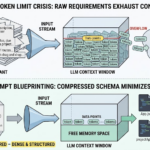 The Token Limit Crisis: How to Feed Complex App Requirements to LLMs Without Running Out of Memory