


Executive Summary: While standard prompt engineering relies on natural language instructions to guide AI code generators, Blueprint Engineering integrates database schemas, hosted backend APIs, and deterministic layout styles into a single master instruction set. This structured approach eliminates AI hallucinations and code drift, enabling developers to build production-ready applications with predictable, scalable results.
The Limitations of Casual Prompt Engineering
The rise of Large Language Models (LLMs) has changed the way we approach software engineering. Today, anyone can open an AI tool, type a simple phrase like “create a project tracker application,” and receive working code within seconds. This process—widely known as prompt engineering—has democratized basic software prototyping. However, as applications grow in complexity, developers rapidly hit a technical wall.
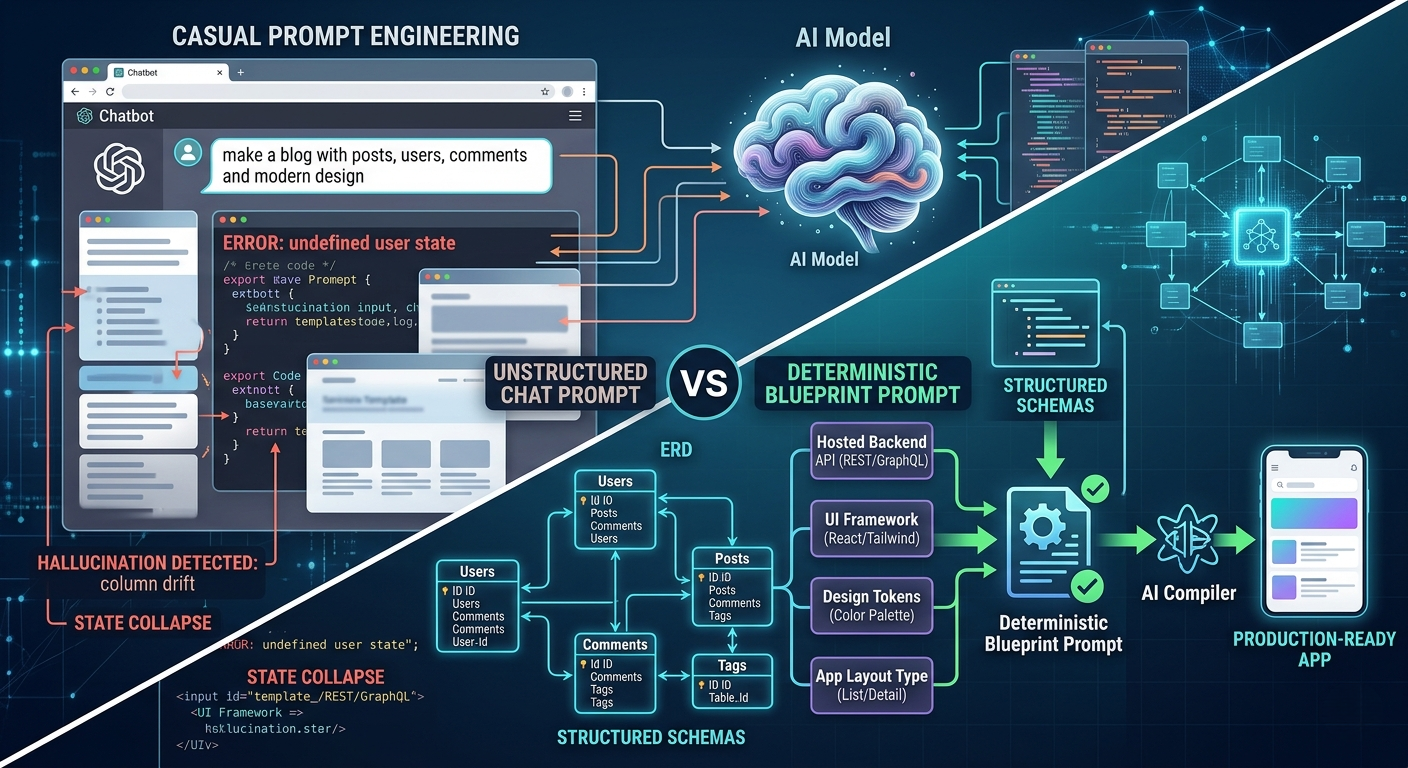
Traditional prompt engineering relies on natural language to describe both layout and behavior. Because human language is inherently ambiguous, AI code generators are forced to make assumptions. When building multi-page applications, these assumptions lead to inconsistent architectures, broken database configurations, and code drift. To build scalable software, the industry is moving past casual chat prompts toward a more disciplined methodology: Blueprint Engineering.
What is the Difference Between Prompt Engineering and Blueprint Engineering?
To understand why AI-generated applications often fail at scale, it is helpful to contrast how these two approaches handle software architecture. While prompt engineering treats the AI as a creative writer, Blueprint Engineering treats it as a precision compiler.
| Architectural Attribute | Casual Prompt Engineering | Deterministic Blueprint Engineering |
|---|---|---|
| Backend Infrastructure | Hallucinated or mocked by the AI using local browser storage. | Pre-provisioned, live cloud database with accessible backend APIs. |
| UI & Layout Control | Vague instructions (e.g., “make it look modern and clean”). | Explicit design systems, component themes, and strict layout types. |
| Predictability & Replicability | Low. The same prompt can produce entirely different code on next execution. | High. The structured instruction payload guarantees consistent output. |
| Context Window Efficiency | Wastes tokens on conversational explanations and repetitive debugging. | Optimized, high-density system specifications that maximize model tokens. |
The Three Core Pillars of a Production-Ready AI Blueprint
Blueprint Engineering succeeds because it removes guesswork from the generative software development lifecycle. A production-ready blueprint prompt tightly couples three vital technical layers together into a single master instruction payload:
1. The Managed Data Layer (The Foundation)
An application cannot function without permanent data storage. Instead of letting the AI guess your database schema, a blueprint incorporates an explicit Entity-Relationship Diagram (ERD). It details exact tables, column data types, foreign key relationships, and unique constraints. Most importantly, it links directly to a pre-configured, live cloud database managed under a dedicated superuser account. The AI engine never has to worry about cloud infrastructure setup; it simply writes client code to interface with operational database endpoints.
2. The Rigid UI Design System
Vague design adjectives result in mismatched components and messy interfaces. Blueprint Engineering explicitly defines the design tokens. It informs the LLM exactly which framework to target (such as React, Svelte, Vue, or Angular), which style library to deploy (like Tailwind CSS v4 or Bootstrap), and references precise color palettes and component themes. This ensures the generated user interface looks unified across every viewport.
3. Structural App Layout Types
Different business problems require different user experiences. A blueprint strictly outlines the functional architecture of the client application. By specifying an explicit layout type—whether it is a Kanban board, a multi-step form wizard, a tabbed dashboard, or a split list-with-details screen—the blueprint provides the AI with a structural grid. This prevents the model from generating random, mismatched page flows.
How Visual Paradigm App Studio Automates Blueprint Engineering
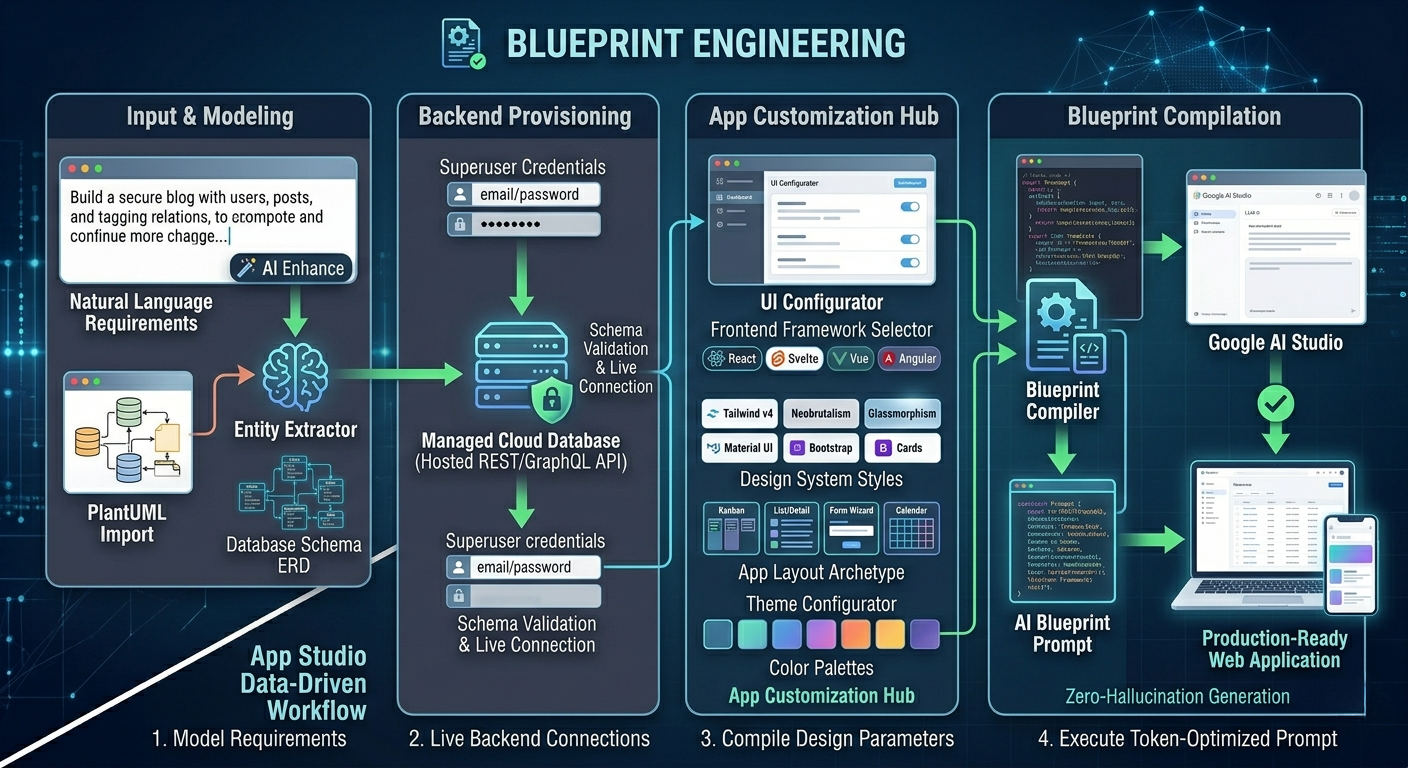
Manually constructing a dense blueprint prompt containing database schemas and layout instructions is complex. Visual Paradigm’s AI-Powered App Studio automates this entire orchestration pipeline within a single environment. The application building workflow transitions from abstract thought to compiled code seamlessly:
- Step 1: Data Modeling: You define your application requirements using an intuitive, AI-enhanced natural language input box, or you directly paste your own PlantUML ERD database designs.
- Step 2: Schema Validation: App Studio’s integrated engine evaluates the design, flags anomalies, and displays a complete, visual Entity-Relationship Diagram with explicit columns and associations.
- Step 3: Backend Provisioning: By supplying your email and password credentials, the platform instantly stands up a secure, managed backend database and provisions operational REST APIs in seconds.
- Step 4: Design Compilation: You choose your development framework (e.g., React or Svelte), select modern UI styles (such as Tailwind CSS v4, Neobrutalism, or Glassmorphism), select a color theme, and assign an explicit application layout archetype.
Once compiled, App Studio generates a master AI Blueprint Prompt. When you paste this token-dense payload into high-capacity LLM workspaces like Google AI Studio, the model behaves deterministically. It reads the pre-configured database endpoints, follows the structured layout rules, and generates a fully integrated, production-ready frontend on your very first try.
Step Into the Future of AI Software Architecture
Relying on casual chat prompts to construct enterprise software leads to repetitive bugs, architectural collapse, and frustrating code hallucinations. Embracing Blueprint Engineering shifts your development workflow from unpredictable experimentation to precision engineering.
By locking down your hosted database infrastructure and application parameters first, you maximize the efficiency of generative AI platforms. You can securely return to your control hub at any time to update your running schema, manage operational data records, or auto-generate mock data to validate new frontend screens.
Stop writing raw prompts from scratch and start engineering your software blueprints. Open the tool and deploy your next application backend directly within the Visual Paradigm App Studio Workspace. This advanced feature set is immediately accessible to subscribers holding active Visual Paradigm Online Combo Edition or Desktop Professional Edition licenses.
Related posts:
 React vs. Svelte vs. Vue: Choosing the Right Frontend for Your AI-Generated App
 Beyond Vanilla CSS: How UI Styles Like Neobrutalism and Glassmorphism Elevate AI Apps
 Dashboard Layouts Demystified: When to Use Kanban, Tabs, or List-with-Details
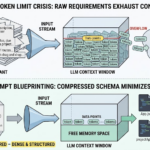 The Token Limit Crisis: How to Feed Complex App Requirements to LLMs Without Running Out of Memory