Google AI Studio is a phenomenal engine for generating frontend code and application logic, but it lacks a native hosting environment for persistent data. Discover how pairing it with a managed backend solves the AI app development equation.
The Power and Limits of Frontend AI Code Generation
Google AI Studio has established itself as an incredibly powerful environment for developers, prototyping teams, and software engineers. Leveraging advanced Large Language Models, it allows users to experiment with complex prompts, adjust system instructions, and generate highly articulate application source code. Whether you need a responsive React interface, a lightweight Svelte script, or structured business logic, the platform handles frontend coding tasks with remarkable speed.
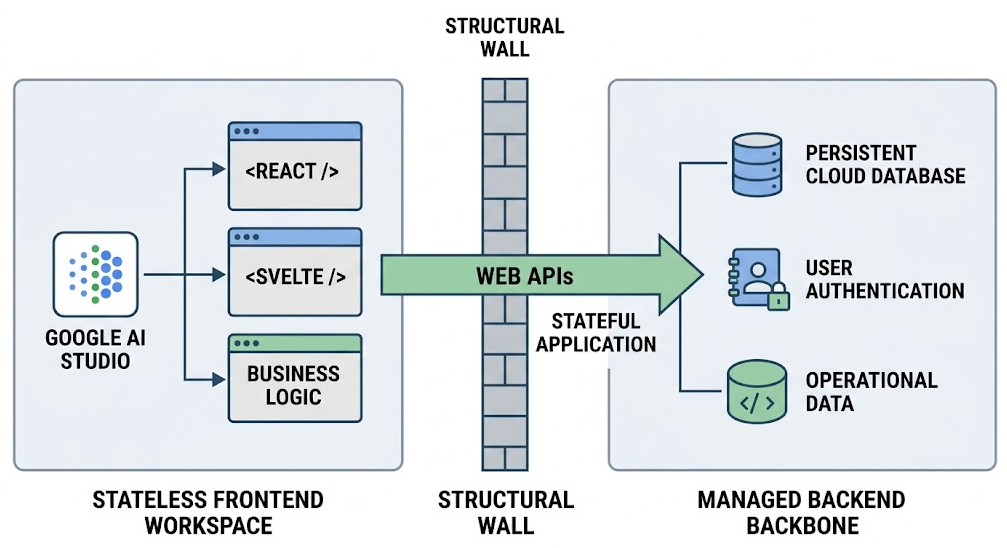
However, when developers attempt to cross the line from a basic user interface mockup to a living, production-ready web application, they face a structural wall. Google AI Studio is designed as a stateless AI development workspace. It excels at outputting code strings, but it does not provision servers, host active infrastructure, or provide persistent storage. It writes the client-side experience, but the critical database backbone remains missing.
Without an integrated data persistence layer, an AI-generated application cannot maintain state. User accounts cannot be saved, operational records disappear upon browser refresh, and relational data objects have no permanent home. To build truly scalable applications, developers must bridge the gap between frontend generation and managed backend infrastructure.
Why Google AI Studio Needs a Pre-Engineered Database Anchor
When you ask a generative model inside Google AI Studio to construct an application that requires data management, the model is forced to make assumptions. If you haven’t explicitly anchored those assumptions to an existing, live database schema, the software generation workflow suffers from three distinct architectural problems:
- Mock Data Limitations: The large language model will typically default to creating local arrays or utilizing browser
localStorage. While this allows a mockup to function temporarily, it cannot scale, secure data, or support multiple concurrent users. - Relational Context Shift: As your conversational workspace grows and you ask for secondary features, the model’s context window can subtly drift. It may change database column names, forget table constraints, or write conflicting foreign key logic that breaks application flow.
- Connection Configuration Hassles: Even if the AI writes standard database code, it cannot spin up the target server infrastructure. You are still left with the manual chore of setting up cloud variables, managing container deployment, and configuring network firewalls.
The solution is to provide the AI with a complete architectural anchor before it ever writes a line of code. By combining your app ideas with a pre-provisioned database and managed backend web APIs, you give the generative engine a rigid blueprint to follow.
Transforming AI Code via Data-First Blueprints
A data-first approach to software development entirely flips the generative process. Instead of asking Google AI Studio to invent an app from text requirements alone, you build and host the underlying relational database framework first. Once that structural layer is live, its schemas, endpoints, and credentials are compiled into a deterministic master instruction set: an **AI Blueprint Prompt**.
When you copy this advanced blueprint prompt payload into your Google AI Studio workspace, the model behaves completely differently. It no longer needs to guess how tables relate or how endpoints function. It simply reads the hardcoded cloud database paths, references the exact entity definitions, and focuses entirely on generating a robust frontend client that communicates with your active backend out of the box.
How Visual Paradigm App Studio Completes the Architecture
Manually spinning up secure servers, managing SQL tables, and composing dense prompt tokens containing connection parameters requires deep DevOps expertise. Visual Paradigm’s AI-Powered App Studio automates this complete infrastructure pipeline in four straightforward steps, functioning as the missing backend counterpart to your AI engineering workflow:
- Requirements Compilation: You enter your core application ideas into the system’s text workspace—utilizing an integrated AI prompt enhancer to clarify abstract requirements—or you directly supply a plain-text PlantUML database design.
- Relational ERD Validation: The platform analyzes your inputs, checks for configuration logic anomalies, and visualizes your exact software architecture using an interactive Entity-Relationship Diagram complete with columns, data types, and foreign key relations.
- Instant Cloud Deployment: By entering an administrative email address and password string, App Studio instantly provisions a secure, cloud-hosted relational database container and exposes fully active, zero-configuration backend web APIs in seconds.
- Deterministic Blueprint Compilation: You pick your desired app parameters, including client frameworks (such as React, Svelte, Vue, or Angular), design styles (like Tailwind CSS v4, Bootstrap, Glassmorphism, or Neobrutalism), and theme layouts (such as Kanban boards, Wizards, or List-with-Details configurations).
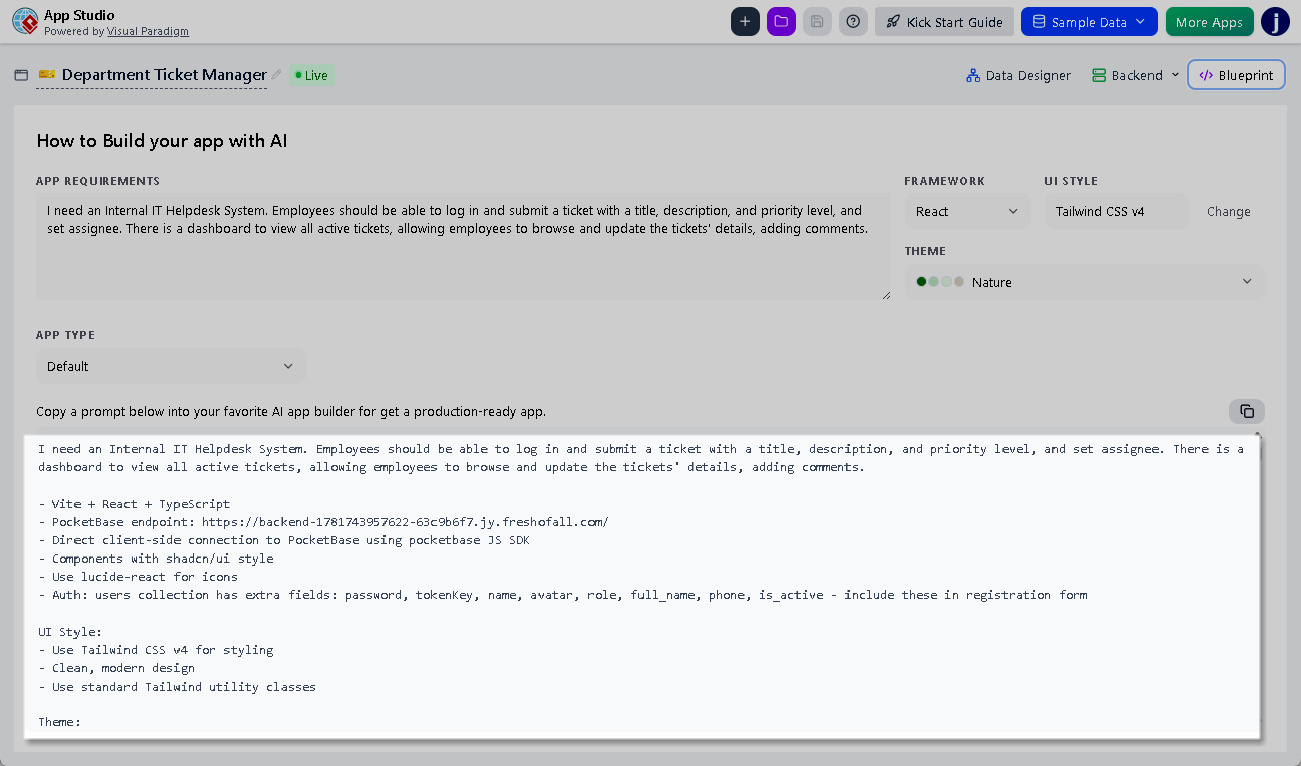
The platform instantly synthesizes these elements into a master, token-dense prompt payload. When you carry this payload into Google AI Studio, the language model reads a complete, unambiguous architectural map. It outputs production-ready frontend client applications that read and write data to your live database container seamlessly on your very first try.
Persistent Administration and Lifecycle Verification
Securing a production-ready application environment requires long-term operational support. Beyond initial generation handoffs, App Studio acts as a permanent hub for your software runtime layers. You can log back into your centralized dashboard at any point to inspect records, manage user fields, or modify relational tables as your real-world usage expands.
Furthermore, testing new user flows inside Google AI Studio is drastically accelerated through an integrated synthetic data seeding utility. Instead of spending hours manually filling out forms to test if lists display or sort correctly, you can auto-populate your running backend with contextually relevant mock data instantly. This allows you to validate complex viewport layouts, grid cards, and multi-step workflows with real datasets under live operational conditions.
Bridge the Gap Between Conception and Deployment
Relying on standalone AI code assistants to manage full application state logic results in fragile code, endless debugging loops, and disconnected interfaces. True development scalability is achieved by anchoring generative AI to a structured backend foundation.
By pairing the code generation speed of Google AI Studio with the automated database provisioning of App Studio, you remove infrastructure friction completely. You protect your code models from hallucinations, eliminate manual database setup times, and secure an enterprise-ready pipeline for your application prototypes.
Ready to provision your cloud backend database and export your next master software prompt? Access the developer tools directly at